news · gaming
HoloCozy Is Out on Steam. Here’s What the Demo and Full Game Include
HoloCozy is available on Steam. See which hololive members are in the full game, what the free Tokino Sora demo includes and where to check system support.
 By Aram Anwar2 min read

HoloCozy is available on Steam, and the free demo lets you try Tokino Sora’s room. The paid game adds four hololive members: Usada Pekora, Shiranui Flare, Shirogane Noel and Houshou Marine. CCMC announced the release on November 13 in Japan. The U.S. Steam listing shows November 12.
What’s in the free HoloCozy demo?
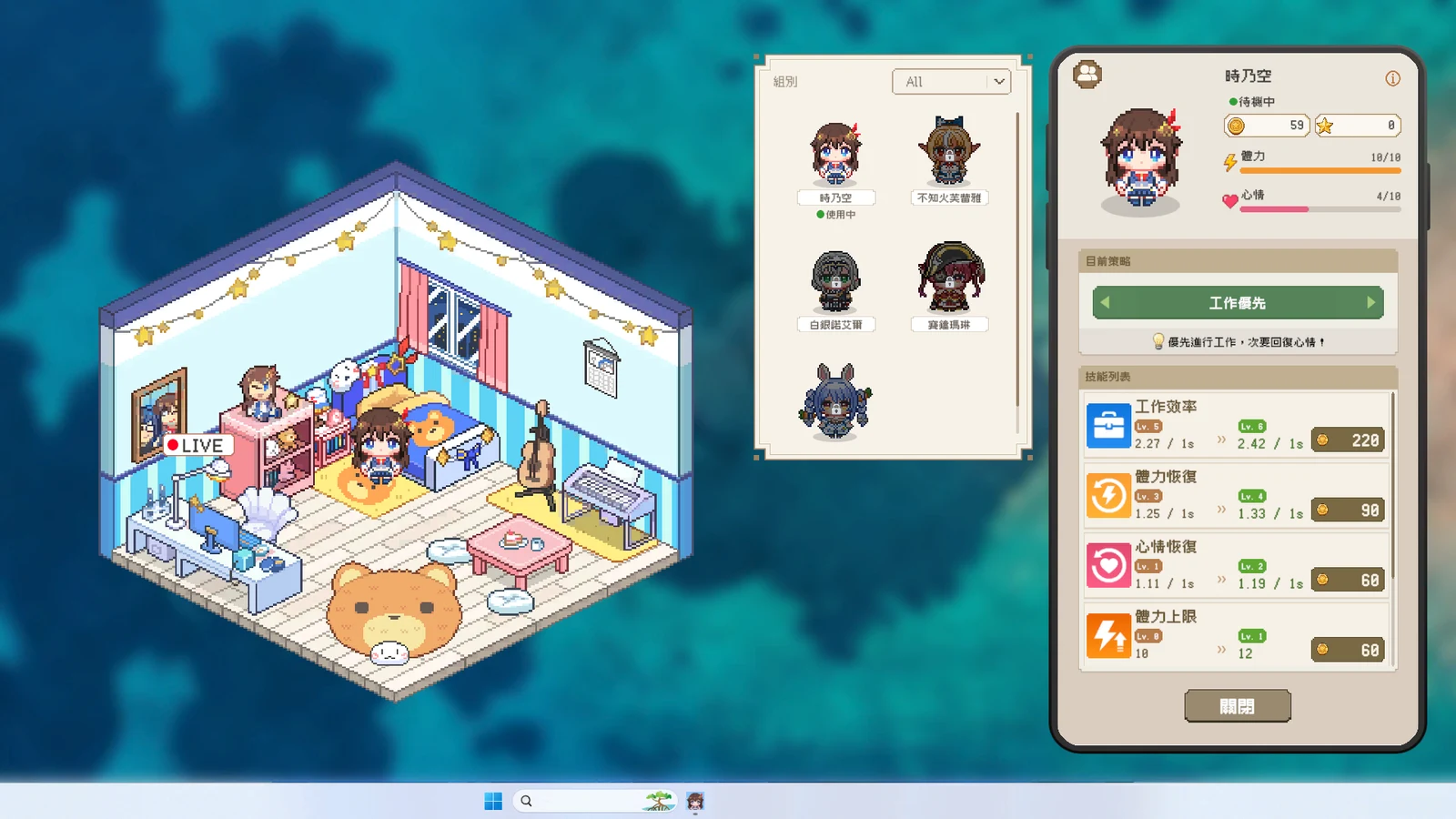
The demo announcement confirms that Sora is the playable character. You can see the other four in previews. The demo also gives you the Pomodoro timer, calendar, music, ambient sounds and a game of blackjack against the computer. It’s a way to check how much room the companion takes up on your desktop before buying.
What does the full game add?
The launch announcement confirms five members in total. Each goes about her day according to her mood and energy. You earn coins by spending time together and use them to furnish the room. Some pieces of furniture change what the character can do. The full game also includes room sharing with friends, hololive stream notifications and three minigames.
The in-game phone collects the tools that matter if you’re keeping HoloCozy open while you work. You can set focus and break periods, check a calendar, or play rain and fireplace sounds.
Which systems does Steam list?
The current Steam listing lists 64-bit Windows 10 and macOS 11 Big Sur as the minimum operating systems for those builds. Ninth Games’ press kit also lists Linux, and Steam’s catalog contains Linux system requirements. On the U.S. Steam page, the demo showed Windows, macOS and Linux icons, while the paid package showed Windows and macOS. If you’re on Linux or Steam Deck, try the free demo and check the icons on the paid listing before buying.
For another cozy game with a home to furnish, see our Duck Side of the Moon update guide.
Sources
Make Red Reactions a preferred source
Choose Red Reactions as a preferred source in Google Search.
Confirm your choice on Google.
Related coverage

SteamDB Has Been Acquired by Nexus Mods' Owner — What Changes, What Stays Free and Why Users Are Worried
SteamDB has joined the same ownership group as Nexus Mods under Chosen. Here's what actually changes, what SteamDB and Chosen have promised will stay free, and what's still just being explored.

Metal Gear Solid 4 Is Finally Free From the PS3 After 18 Years
Metal Gear Solid: Master Collection Vol. 2 brings Metal Gear Solid 4: Guns of the Patriots to PS5, Xbox, Steam and Switch, ending 18 years of PS3 exclusivity.
ScopeCreep Is Out on Steam and Turns Every Beat Into an Attack
ScopeCreep launched on Steam on November 16. Here’s how its soundtrack drives combat, how upgrades work and where to try the free demo.

Girls und Panzer: All-Star Tank Carnival Adds PS5 and Steam With Crossplay
D3Publisher adds PS5 and Steam to the Switch 2 game. Check the March 25 Japan date, crossplay rules, Japanese language listing and limited editions.

PIERCING on Steam: What the Demo, Endings and Blood Color Setting Offer
Buri Games’ short rhythm game PIERCING has a free Steam demo, multiple endings and a setting that changes blood color. Here’s what to expect before you play.

Dead Party Co-op Explained: Split-Screen, Online Play and the Console Status
Dead Party supports up to four players and Steam lists split-screen, online co-op and Remote Play Together. Here is what Snail Games confirmed about consoles.
About the author
Aram Anwar
Founder & Editor
Aram Anwar founded Red Reactions and writes across comics, gaming, movies and television. His work includes franchise guides and large Lore / Explained features, with an emphasis on separating confirmed details from reports, theory and speculation.
Coverage: Comics · DC & Marvel · Gaming · Movies & TV · Lore / Explained · Guides
More from Aram Anwar